

توضیحات
Reviso turns WordPress into a true client-collaboration tool. Reviewers (clients, teammates, stakeholders) leave pinned feedback directly on your live pages, no logins, no email chains, no PDF round-trips. It’s native to the Bricks and Elementor builders and the Gutenberg block editor, and works on any WordPress theme or site.
Reviso is a visual feedback and website proofing tool for WordPress: clients annotate any element with a pinned comment, you action it inside your builder, and you close each round with a recorded sign-off, which cuts revision rounds.
For wording changes, reviewers can go further than commenting. Suggest mode is tracked changes for websites: they propose the new wording in place on the live page, and you accept or reject it in one click, so you never have to work out what “can we reword this?” actually meant.
Because every pin captures an automatic screenshot plus the page, browser, operating system and screen size, the same review link doubles as a lightweight bug report and QA channel for launch snags, without sending anything to a third-party service.
What’s in the free version
- Pinned comments on any element: desktop, tablet, or mobile
- Threaded replies so a back-and-forth doesn’t sprawl across messages
- Status tracking: open, in progress, resolved, with filters
- Single-page review links: share one page at a time with anyone, no login required
- Works in maintenance & coming-soon mode: review links open the real page for invited clients even while Bricks or Elementor maintenance mode is on, so you can collect feedback before launch without taking the site public
- Admin-bar quick-review: spin up a review for the current page (or whole site, Pro) from the Reviso icon on the front-end admin bar
- Client approvals: reviewers can mark a page as approved (own admin tab, Reviso Approvals)
- Email notifications when someone leaves a comment, replies, or approves a page, with optional burst-coalescing so a flurry of comments arrives as a single email
- Builder-native UI: the comment overlay adopts the look of Bricks, Elementor or the block editor so it never feels bolted on
- Element-anchored pins that survive page edits (three fallback strategies: DOM, content, position)
- Suggest mode: reviewers propose replacement wording directly on the page, like a tracked change, and you accept or reject each one (applying an accepted edit inside Bricks is Pro)
- Internal comments: pin private team-only notes on any page, including archives, listings and search results, and share a thread with the client only when you choose
- Emoji reactions on any comment, so “yes, agreed” doesn’t need a whole reply
- Optional reviewer email: clients can leave feedback with just a name
- Feedback dashboard: every pinned comment across the whole site in one list
- Automatic screenshots with page, browser, OS and viewport context attached to each pin
- Cache-proof review links: reviewer sessions bypass W3 Total Cache, WP Rocket, LiteSpeed, WP Super Cache, Cache Enabler and SiteGround Optimizer, so a share link never shows a stale page
- Review drafts and unpublished pages through a private link before anything goes live
- Close on finish: a review can stop taking new comments once the client marks it done, with one-click reopen
Available with the Pro addon
Reviso Pro extends the free plugin with:
- Multi-page Reviews: bundle a whole site (or any subset of items) into one shareable Review, covering any post type and templates
- Email-restricted Reviews: each invitee gets a private magic link, with four roles (Viewer / Reviewer / Approver / Lead)
- Apply suggested edits in Bricks: accept a reviewer’s proposed wording and Reviso writes it to the page, taking a revertable snapshot first and purging common page caches so it shows immediately
- AI: automatic comment triage (bug / design / copy / content) and AI-summarised feedback rollups
- Reviso Cloud (Beta): manage feedback and approvals across all your sites from one dashboard, and optionally connect your own AI assistant to help action it
- White-label: your agency branding on the review portal, with light + dark logos that auto-pick the right variant for each surface (portal, builder splash, email header)
- Integrations: Slack, Discord, and generic webhooks (Zapier/Make ClickUp, Trello, Jira, …)
- Email digests: optional weekly summaries
- Advanced notifications: multi-recipient delivery, From/Reply-To control, printable approval certificates
- Audit log + per-reviewer revoke
- Concurrent reviews with configurable expiry, including a no-end-date option
The Pro addon requires this free plugin to be installed.
Privacy & data
Reviso stores comment data on your own WordPress site. We don’t see your reviewers’ feedback unless you opt in to Reviso Cloud’s AI features (Beta), which relay the items the assistant acts on to getreviso.io (see External services below). Optional anonymous telemetry (off by default) is opt-in. Full details in our privacy policy.
External services
This plugin can connect to external services run by us (Reviso, getreviso.io). Each is opt-in and described below.
Anonymous usage telemetry (opt-in). When, and only when, you switch telemetry on in Settings Reviso, the plugin sends a small weekly ping to https://getreviso.io. It contains version numbers, which features are enabled, and a random install ID, and never contains your pages, your reviewers’ comments, email addresses, or any personal data. If you installed Reviso by searching inside your WordPress admin, it also includes the search phrase you used (for example “client feedback”), so we can see how people find the plugin; it is recorded once at activation, capped at 60 characters, and is blank if you activated Reviso from your plugins list. It is used to prioritise fixes and features. You can turn it off again at any time, which stops all pings. Terms: https://getreviso.io/terms-of-service/ , Privacy policy: https://getreviso.io/privacy-policy/
Reviso Cloud (opt-in, Beta). An optional hosted service that connects your site to a Reviso Cloud account so you can manage feedback across all your sites from one dashboard and, in Beta, let an AI assistant you authorise help action that feedback. It does nothing unless an administrator connects the site under Settings Reviso Reviso Cloud, and you can disconnect at any time.
- Baseline sync. While connected, the site sends usage metadata to
https://getreviso.io: your site name and address, the account email, your licence tier, and review titles and counts. This alone never sends your feedback content, screenshots, or reviewer details. - AI assistant (Beta). If you use the Reviso Cloud AI tools on a connected site, the specific comments, screenshots, page structure, and reviewer names for the items the assistant reads are sent to
https://getreviso.ioand relayed to the AI agent you connect; with your permission the agent can also write changes back (post replies, resolve comments, edit page content). Only what the assistant acts on is transmitted, and only while you use it.
Terms: https://getreviso.io/terms-of-service/ , Privacy policy: https://getreviso.io/privacy-policy/
عکسهای صفحه


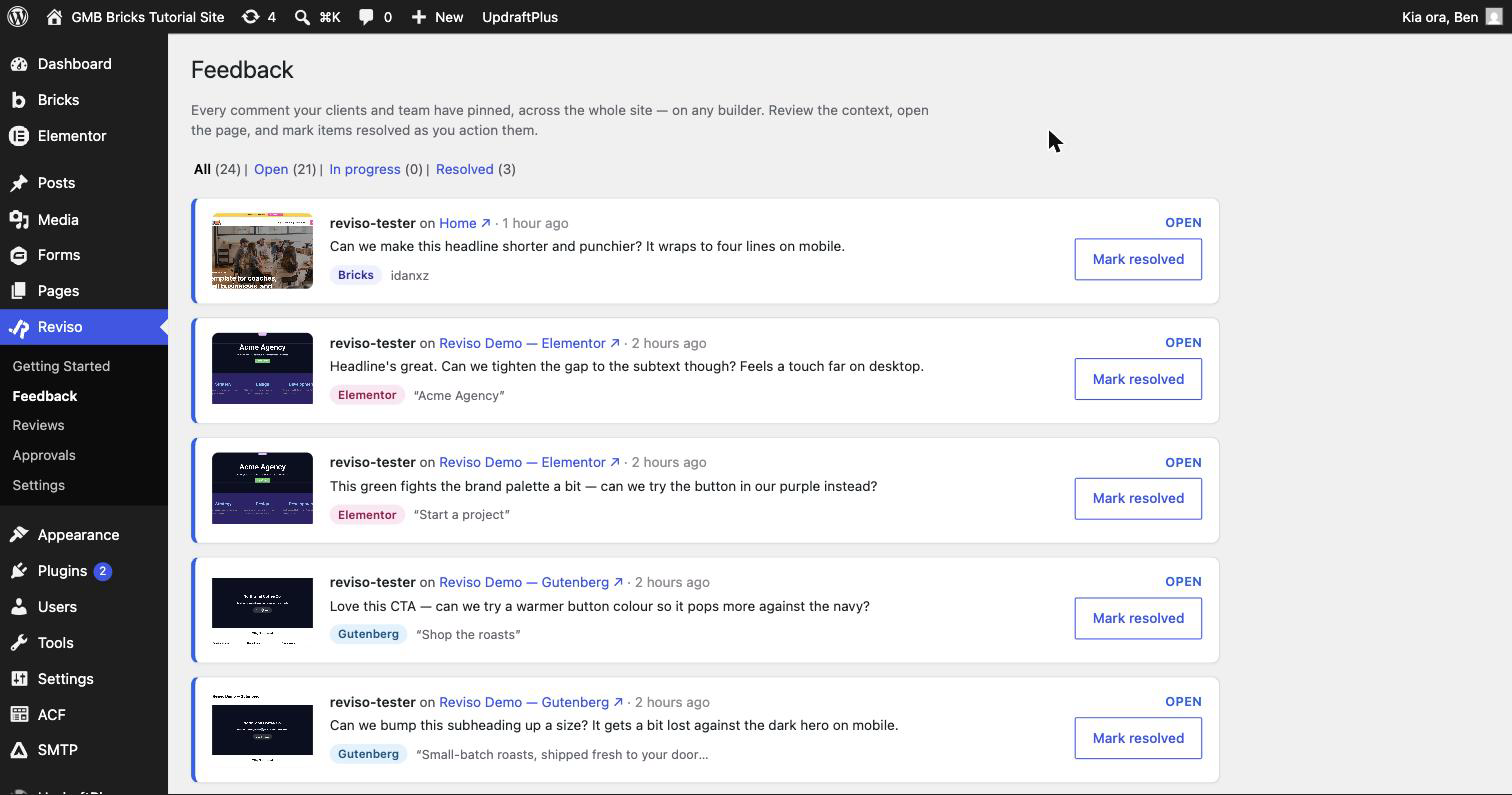

نصب
- Upload the plugin or install from the WordPress.org repository.
- Activate Reviso – Client Feedback & Approvals.
- Open any page in Bricks, Elementor or the block editor, and the Reviso comment overlay appears (bottom-right in the builder).
- (Optional) Install Reviso Pro to unlock multi-page Reviews and the rest of the paid feature set.
سوالات متداول
-
Does this require a license key?
-
No, the free plugin is fully functional. A license key is only needed if you also install the Pro addon.
-
Do my reviewers need a WordPress account?
-
No. Share a review link and your reviewer comments as themselves. Reviso captures their name and email when they leave their first comment.
-
Which page builders does Reviso work with?
-
Reviso is native to the Bricks and Elementor builders and the Gutenberg block editor, and it works on any WordPress theme or site. Pins anchor to each builder’s elements (Bricks
brxe-*IDs, Elementor element IDs, Gutenberg block IDs), with content and position fallbacks so they survive page edits. -
Yes. A valid review link opens the page for your invited client even while Bricks or Elementor maintenance mode is on, with no login. The site stays hidden from everyone else, and revoked, expired or out-of-scope links still see the maintenance screen.
-
Can clients suggest wording changes instead of just commenting?
-
Yes. Suggest mode is tracked changes for websites: a reviewer selects the text on the live page and types what it should say instead, and you accept or reject the suggestion in one click. Suggesting is free on unlimited sites; with Pro, accepting an edit applies it to the page in Bricks and takes a revertable snapshot first.
-
Can I use Reviso for bug reports and launch QA?
-
Yes. Every pinned comment automatically captures a screenshot plus the page URL, browser, operating system and screen size, so a client or tester reporting a broken layout gives you the context you need without a separate bug tracker. Reviews can be set to close once the round is finished, and everything stays in your own database.
-
Is Reviso a website proofing tool?
-
Yes, for live web pages. Reviewers proof the real page in the browser rather than a PDF or a flattened screenshot, on desktop, tablet or mobile, then approve it with a timestamped record (a PDF sign-off certificate is included in Pro). Reviso proofs live web pages, not static images or print artwork.
-
Where is my data stored?
-
In your own WordPress database (
wp_reviso_*tables). Reviso doesn’t transmit your feedback anywhere unless you opt in to Reviso Cloud’s AI features (Beta), which relay the items the assistant acts on to getreviso.io (see External services). The optional anonymous telemetry ping never contains comment content or PII (only version numbers + feature-enabled flags).
نقد و بررسیها


توسعه دهندگان و همکاران
“Reviso – Client Feedback & Approvals” نرم افزار متن باز است. افراد زیر در این افزونه مشارکت کردهاند.
مشارکت کنندگان
ترجمه “Reviso – Client Feedback & Approvals” به زبان شما.
علاقه مند به توسعه هستید؟
کد را مرور کنید, را بررسی کنید مخزن SVN, یا مشترک شوید گزارش توسعه توسط RSS.
گزارش تغییرات
1.6.2
- New: Copy a link to a single comment. “Copy link” in any comment’s menu sends a client straight to the one you mean, opening the review, finding the page and highlighting the comment.
- New: More events for automations (Agency). Send a webhook or Slack message when a comment is edited, deleted, changes status, gets a reaction, or has a screenshot attached. All off until you switch them on.
- Improved: Every comment event now carries a link to the comment, so a task created from a webhook can link straight back to it.
- New: category and custom taxonomy archives can now be reviewed. They appear in the page picker alongside your pages, and an Entire Website review includes them automatically, so a taxonomy landing page is no longer the one part of the site a client cannot comment on.
- Fixed: opening an archive as the first thing in a review showed the bare site with no Reviso on it, because the reviewer session only started when you opened a page. It now starts when the review link does.
- Fixed: archives added to a review disappeared as soon as you saved it. Editing a review never sent them back, so the page showed them ticked and then cleared them.
- New: a setup checklist on the Reviso screen that knows how far you have actually got. One step at a time, each ticked off by looking at your site rather than asking you, and gone for good once you finish. Replaces the old Getting Started page.
- Improved: the trial-ended notice only turns red if something of yours has actually stopped working, and you can hide it for a week.
- Fixed: comment times were wrong unless your database ran on UTC. A comment left a minute ago could say “12 hours ago”, and the panel called anything from the last twelve hours “just now”.
- Fixed: the review dashboard borrowed the site’s heading fonts, so it changed shape from one site to the next. It now matches the feedback panel.
- Fixed: an anti-spam plugin on your site could block your clients’ comments, leaving them with only “Something went wrong”. Reviso now spots the most common cause (CleanTalk) and offers to fix it in one click, and when something else blocks a comment it says so instead of failing silently.
1.6.1 and earlier
Every earlier release is listed in full at https://getreviso.io/changelog/. This
section keeps the current release only, because wordpress.org limits it to 5,000
characters and would otherwise cut the oldest entries off without saying so.