

توضیحات
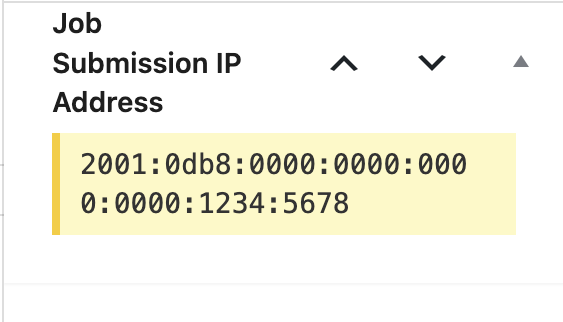
IP Logger for WP Job Manager captures and records the IP address of users who submit job listings through the WP Job Manager plugin. The IP address is stored as post meta and displayed in a custom meta box on the job listing edit screen in the WordPress admin.
Key Features:
– Automatically logs the IP address of job submitters.
– Displays the recorded IP in the WordPress admin interface.
– Lightweight, secure, and developer-friendly.
– Fully translatable with a .pot file included.
عکسهای صفحه
نصب
- Upload the
/ip-logger-for-wp-job-manager/folder to the/wp-content/plugins/directory. - Activate the plugin through the ‘Plugins’ screen in WordPress.
- Make sure WP Job Manager is installed and activated.
- Submit a test job to confirm IP logging works. You’ll see the IP in the job listing edit screen.
سوالات متداول
-
How do I view the recorded IP address?
-
Edit a job listing in the WordPress admin. You’ll find the “Job Submission IP Address” meta box in the right sidebar.
-
Can I translate this plugin?
-
Yes. The plugin uses the
ip-logger-for-wp-job-managertext domain. A.potfile is included in the plugin ZIP for creating translations.
نقد و بررسیها
نقد و بررسیای برای این افزونه یافت نشد.
توسعه دهندگان و همکاران
“IP Logger for WP Job Manager” نرم افزار متن باز است. افراد زیر در این افزونه مشارکت کردهاند.
مشارکت کنندگان
ترجمه “IP Logger for WP Job Manager” به زبان شما.
علاقه مند به توسعه هستید؟
کد را مرور کنید, را بررسی کنید مخزن SVN, یا مشترک شوید گزارش توسعه توسط RSS.
گزارش تغییرات
1.0
- Initial release. Logs and displays the IP address of job submissions.