
توضیحات
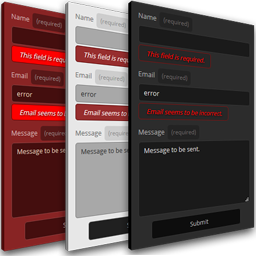
A simple form that could be displayed on the sidebars or any part of footer area. It consists of the usual three input fields: name, email and the message. Emails are automatically sent to the WP Admin address.
If you want to, you can also add the form to any post or page by using a shortcode: [gbsimple_contact_us_widget style=”color_filter”].
Available color filters: red, green, blue, white or black.
!Important: In order to use it a a regular widget your theme must be supporting sidebar/footer area.
There are no restrictions to use it a shortcode on any page/post.
Donations
http://gregbialowas.com/donate
نصب
- Upload plugin to the
/wp-content/plugins/directory (or Install it via WP) - Activate the plugin through the
Pluginsmenu in WordPress - The widget will be available under Appearance -> Widgets -> Simple Contact Us Form Widget
- Select its style and define a positon (either sidebar or footer) or place it on page/post as a shortcode [gbsimple_contact_us_widget style=”color_filter”] – look for
- You are done.
For more information and examples visit this website:
https://gregbialowas.com/simple-contact-widget
سوالات متداول
–
نقد و بررسیها
نقد و بررسیای برای این افزونه یافت نشد.
توسعه دهندگان و همکاران
“Simple Contact Us Form Widget” نرم افزار متن باز است. افراد زیر در این افزونه مشارکت کردهاند.
مشارکت کنندگان

ترجمه “Simple Contact Us Form Widget” به زبان شما.
علاقه مند به توسعه هستید؟
کد را مرور کنید, را بررسی کنید مخزن SVN, یا مشترک شوید گزارش توسعه توسط RSS.
گزارش تغییرات
2.2.1
[2025-05-29]
– Fixed array vs string issue
– Tested: WordPress 6.8.1, PHP 8.3.14
2.2.0
[2022-06-06]
Updated:
* One extra step to fight off the spam.
2.1.2
[2022-03-23]
Updated:
* Challenge copy.
2.1.1
[2022-03-23]
* Few touches on the version tags.
2.1.0
[2022-02-14]
Updated:
* Validation method to further limit spam possibilities.
* The X1 and X2 characters can be randomized in any order.
2.0.0
[2021-06-05]
Changed:
* Way of presenting challenge string. The user is now asked to re-type X and Y character from the generated string rather than typing a mere number ( the sum of two randomly selected digits )
1.1.2
[2020-03-13]
Updated:
* Operation result is displayed inline.
1.1.1
[2020-03-13]
Added:
* Human Verification added. User is asked to provide a result of an operation randomly generated. After sending email the session is killed and new operation is generated.
1.1.0
[2020-02-12]
Added:
* Option to select colors of the form. Available color filters: red, green, blue, white or black.
1.0.0
[2019-11-13]
* Initial release