به محتویات بروید
WordPress.org

فارسی (افغانستان)

  • پوسته‌ها
  • افزونه‌ها
  • اخبار
  • درباره
  • Contact
  • دریافت وردپرس
دریافت وردپرس
WordPress.org

Plugin Directory

WP ShareX

  • Submit a plugin
  • My favorites
  • Log in
  • Submit a plugin
  • My favorites
  • Log in

این افزونه با آخرین 3 نسخه اصلی وردپرس تست نشده است. ممکن است دیگر نگهداری یا پشتیبانی نشود و ممکن است هنگام استفاده با نسخه های جدیدتر وردپرس مشکلات سازگاری داشته باشد.

WP ShareX

توسط joomdev
دانلود
  • جزئیات
  • نقد و بررسی‌ها
  • نصب
  • توسعه
پشتیبانی

توضیحات

WP ShareX is an advanced WordPress Social Share plugin enables you to add social share buttons on Posts and pages. You can assign buttons on Top of the Content, Bottom of the Content, Sidebar and on media.

Features of WP Social Share by JoomDev
1. 24 Social Network
2. You have the option to select either Icons or Icons with Text
3. 3 Button Shapes
4. 4 Button Animations
5. URL Shortening Option with Bitly and Goo.gl
6. Embed Twitter Handle and desired tags with Tweet
7. 4 Button display Location e.i. Top of the Content, Bottom of the content, Media, and Sidebar
8. Hide On Mobile Ability
9. Default Share Count Option. (You can play with your user’s mind)
10. Encourage your Audience to share your content with Share Incentive Feature

عکس‌های صفحه

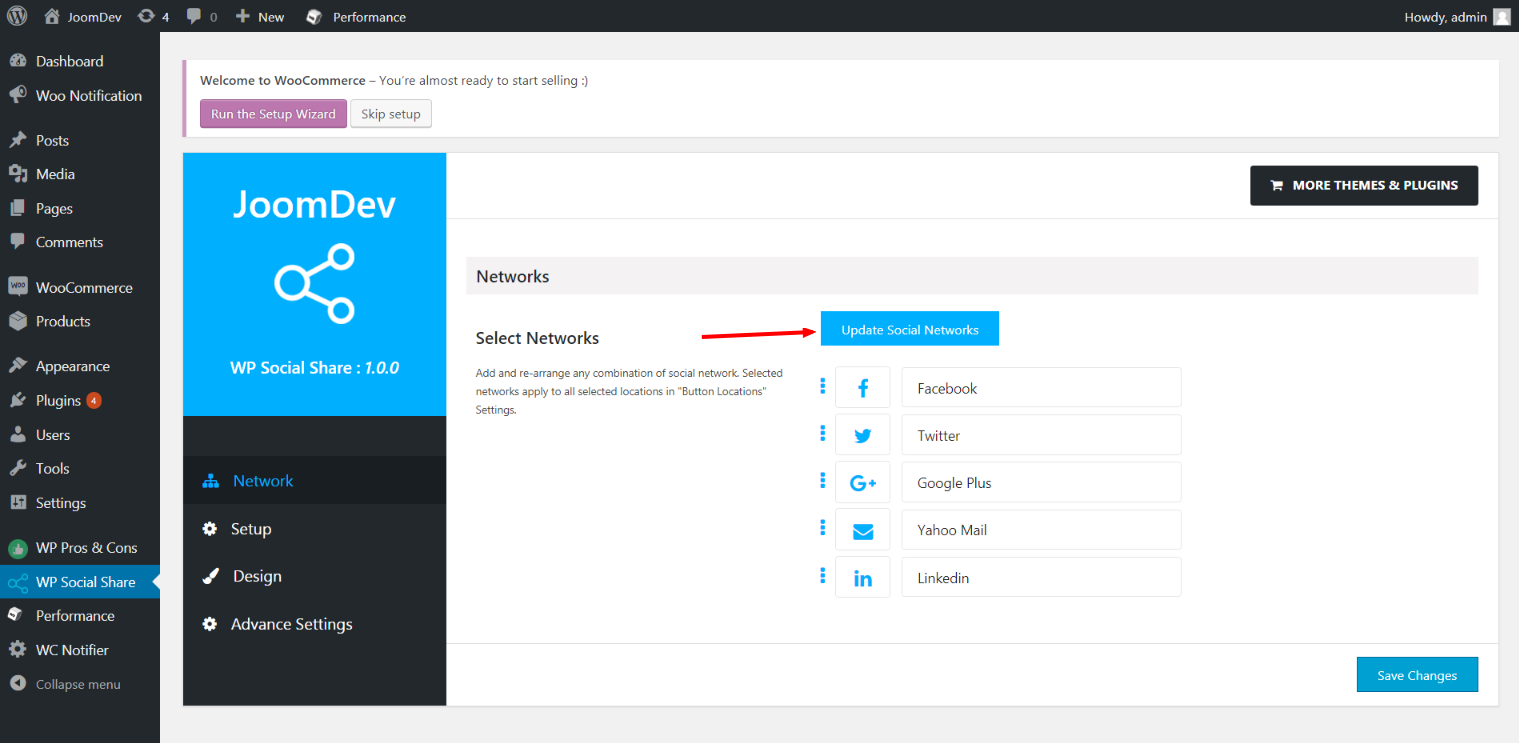
Click here to select networks
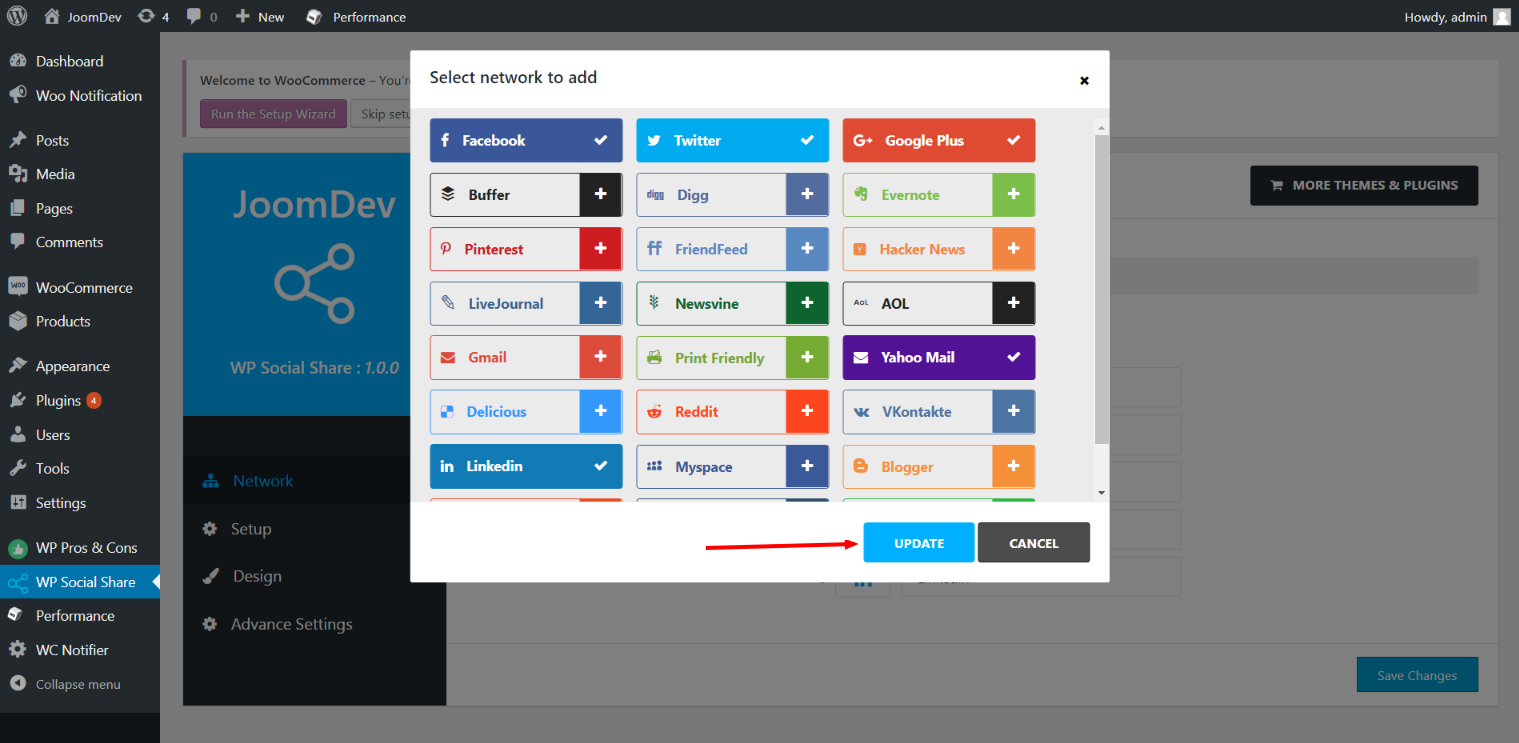
Update networks after selecting them.
Setup plugin and api settings.
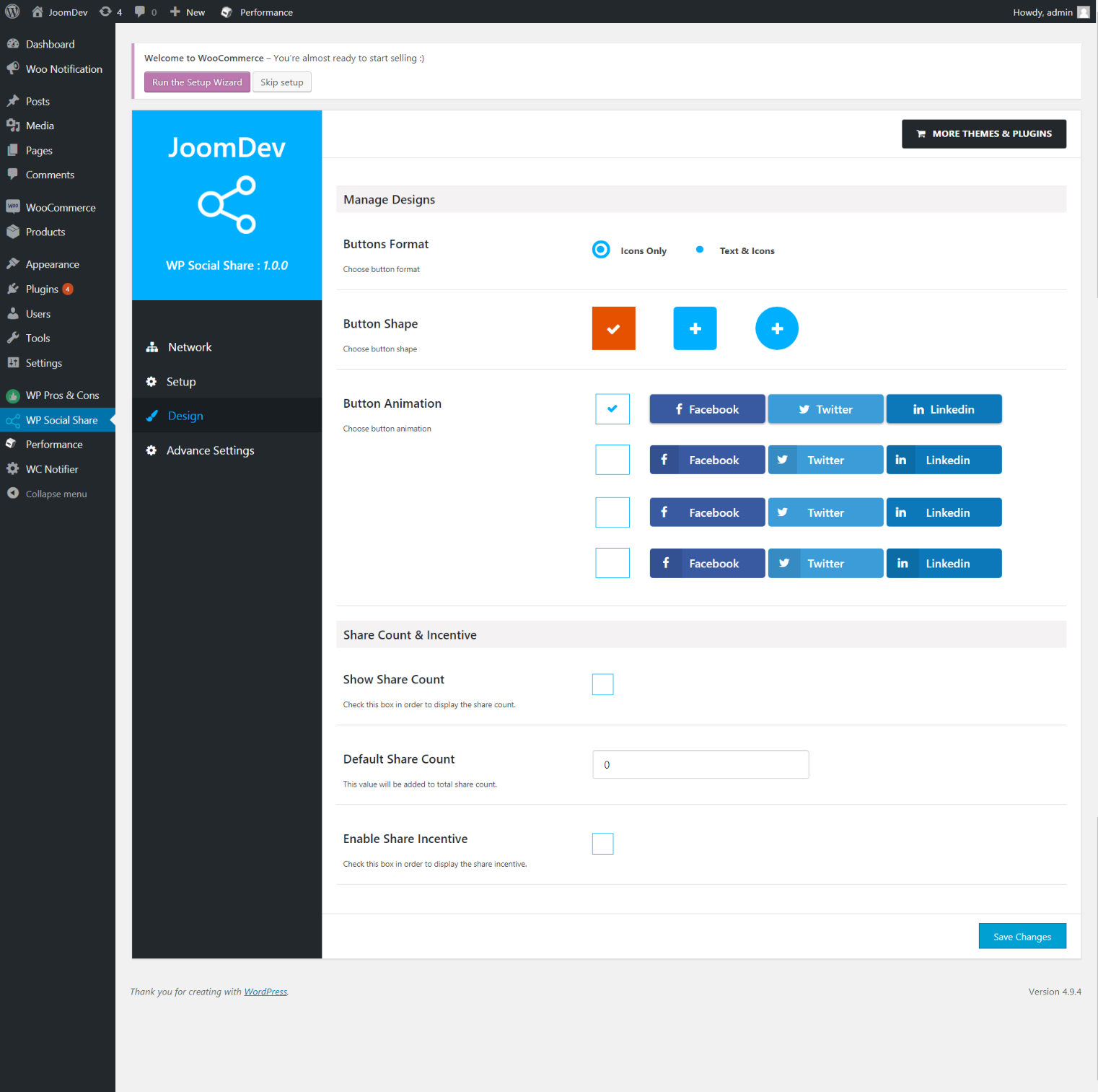
Select any design to display the buttons.
For mobile
For mobile

نصب

Way 1: 1. Upload joomdev-wp-social-share.zip to the /wp-content/plugins/ directory 2. Extract the zip file. 3. Activate the plugin from wordpress plugins page. And you have done.

Way 2: 1. Go to plugins page in admin. 2. Click on Add New button. 3. Search for “WP ShareX”. 4. Click install on WP Social Share. 5. Activate the plugin.

سوالات متداول

Installation Instructions

Way 1:
1. Upload joomdev-wp-social-share.zip to the /wp-content/plugins/ directory
2. Extract the zip file.
3. Activate the plugin from wordpress plugins page. And you have done.

Way 2:
1. Go to plugins page in admin.
2. Click on Add New button.
3. Search for “WP ShareX”.
4. Click install on WP Social Share.
5. Activate the plugin.

How do I use this plugin?

See description.

نقد و بررسی‌ها

Excellent!

Arnab Mohapatra مارچ 16, 2018 1 پاسخ
Incredible plugin. It allows to add any sharing button on the page simply and fast!
خواندن تمامی 1 نقد و بررسی‌

توسعه دهندگان و همکاران

“WP ShareX” نرم افزار متن باز است. افراد زیر در این افزونه مشارکت کرده‌اند.

مشارکت کنندگان
  • joomdev

ترجمه “WP ShareX” به زبان شما.

علاقه‌ مند به توسعه هستید؟

کد را مرور کنید, را بررسی کنید مخزن SVN, یا مشترک شوید گزارش توسعه توسط RSS.

گزارش تغییرات

1.0.0

  • New Plugin initialized.

اطلاعات

  • Version 1.0.0
  • Last updated 8 سال پیش
  • Active installations 10+
  • WordPress version 3.0 یا بالاتر
  • Tested up to 4.9.29
  • Language
    English (US)
  • Tags
    sharesocialsocial share
  • نمایش پیشرفته

امتیازها

5 out of 5 stars.
  • 1 5-star review 5 stars 1
  • 0 4-star reviews 4 stars 0
  • 0 3-star reviews 3 stars 0
  • 0 2-star reviews 2 stars 0
  • 0 1-star reviews 1 star 0

Your review

See all reviews

مشارکت کنندگان

  • joomdev

پشتیبانی

چیزی برای گفتن دارید؟ نیاز به کمک دارید؟

مشاهده انجمن پشتیبانی

کمک مالی

آیا تمایل دارید از پیشرفت این افزونه حمایت کنید؟

کمک مالی به این افزونه

  • درباره ما
  • اخبار
  • میزبانی
  • حریم خصوصی
  • ویترین
  • پوسته‌ها
  • افزونه‌ها
  • الگوها
  • یادگیری
  • پشیتبانی
  • توسعه‌دهندگان
  • WordPress.tv ↗
  • مشارکت کنید
  • رویدادها
  • حمایت ↗
  • پنج برای آینده
  • WordPress.com ↗
  • مت ↗
  • بی‌بی‌پرس ↗
  • بادی‌پرس ↗
WordPress.org
WordPress.org

فارسی (افغانستان)

  • از حساب X (تویتر سابق) ما دیدن کنید
  • Visit our Bluesky account
  • Visit our Mastodon account
  • Visit our Threads account
  • صفحه ی فیسبوک ما را بازدید نمایید
  • بازدید از حساب کاربری ما در اینستاگرام
  • بازدید از حساب کاربری ما در LinkedIn
  • Visit our TikTok account
  • از کانال یوتیوب ما دیدن کنید
  • Visit our Tumblr account
کد شعر است.
The WordPress® trademark is the intellectual property of the WordPress Foundation.