
توضیحات
Useful for websites where the default Admin Toolbar is not fitting well into the design. Many website owners/clients show the their website to their customers from laptops that are also used for administration of the website and thus the experience is ruined by the black toolbar right in the top.
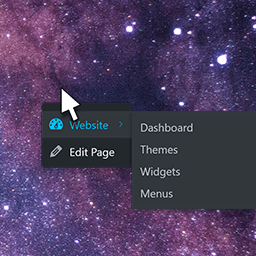
With Admin Right Click Menu you can still use the handy frontend admin shortcuts – e.g. ‘Edit Page’ – just in a small fly-out menu. The menu is initially hidden but is activated by right clicking on user-defined element(s) on the website.
عکسهای صفحه

The settings found in ‘Settings’ > ‘Admin Right Click Menu’ 
At the frontend right click the element(s) that you have put in the Settings
نصب
Extract the zip file and drop the contents in wp-content/plugins/ folder of your WordPress installation and then activate the plugin from \’Plugins\’ menu.
Go to ‘Settings’ > ‘Admin Right Click Menu’ for options.
The most important thing is to set a selector. You coud start by just typing in body
نقد و بررسیها
نقد و بررسیای برای این افزونه یافت نشد.
توسعه دهندگان و همکاران
“Admin Right Click Menu” نرم افزار متن باز است. افراد زیر در این افزونه مشارکت کردهاند.
مشارکت کنندگان
ترجمه “Admin Right Click Menu” به زبان شما.
علاقه مند به توسعه هستید؟
کد را مرور کنید, را بررسی کنید مخزن SVN, یا مشترک شوید گزارش توسعه توسط RSS.
گزارش تغییرات
1.0
- First version. First plug-in. First time with SVN 🙂
1.1
- Spelling errors.
1.3
- FIX: Update menu was not removed correctly.