
توضیحات
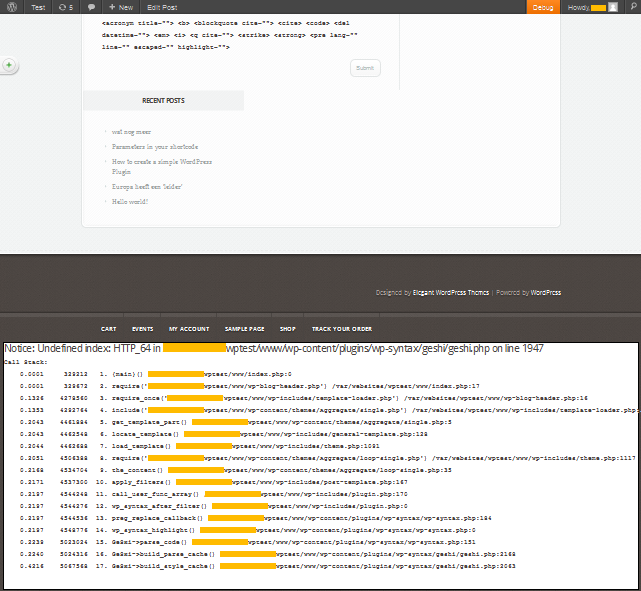
This WordPress Plugin collects the Xdebug output and displays it in the footer. It both works in the front end and in the administrator interface of WordPress
Please make sure that you comply to the following dependencies: * have the Xdebug extension for PHP activated (zend_extension=/[path to libraries]/xdebug.so) * have defined your ‘WP_DEBUG’ as true (in wp_config.php) to see also Notices
This plugin does nothing with the profiler output of Xdebug. When Xdebug is enabled on your webserver, outputted errors will be expanded with a Call Stack which shows which calls led to the error. This plugin takes care of displaying these errors in a nice way.
عکسهای صفحه
نصب
This section describes how to install the plugin and get it working.
- Extract the
xdebug-outputhandler.zipto the/wp-content/plugins/directory - Activate the plugin through the ‘Plugins’ menu in WordPress, its named
Xdebug Output Handler - Enable the Xdebug extention on your webserver
- Change define(‘WP_DEBUG’, false) to define(‘WP_DEBUG’, false) in wp-config.php to see also Notices
سوالات متداول
Where can I find more information about Xdebug
Please visit http://xdebug.org/index.php
Where can I find more information about define(‘WP_DEBUG’, false)
Please visit https://codex.wordpress.org/Editing_wp-config.php#Debug
نقد و بررسیها
نقد و بررسیای برای این افزونه یافت نشد.
توسعه دهندگان و همکاران
“Xdebug Output Handler” نرم افزار متن باز است. افراد زیر در این افزونه مشارکت کردهاند.
مشارکت کنندگان
ترجمه “Xdebug Output Handler” به زبان شما.
علاقه مند به توسعه هستید؟
کد را مرور کنید, را بررسی کنید مخزن SVN, یا مشترک شوید گزارش توسعه توسط RSS.
گزارش تغییرات
1.0
- First version